

Forwarding to N+P Platform
In addition to local recording on the Edge system, data can also be forwarded to other systems such as the N+P platform. The following describes how the configuration on the Edge must be carried out to establish communication with the platform and transmit selected measured values.
Prerequisites
Section titled “Prerequisites”For the Edge to communicate with the N+P platform, the gateway functions must first have been installed. This may have already been done at delivery, or must be done retroactively with an update package.
In the advanced UI for configurations, the version of the Edge is displayed in the lower left corner. If the name contains “-nup1.x” (x may vary depending on version), then the required functions and services have already been installed. Otherwise, the appropriate update package, e.g. “update-2.12.2-nup1.1”, must be installed.
Setting up communication (one-time)
Section titled “Setting up communication (one-time)”- Set BMK:
- In the “System” → “Settings” area, click the “General” section
- Enter the name defined for the cloud as the BMK of the Edge
- Click save
- In the “System” → “Gateway” area, select the NuP Endpoint (crawler-app-gateway-endpoint.nup). The following settings must be made here:
- Set address:
- In the “Connection” area, click the pencil icon in the top right.
- Set address:
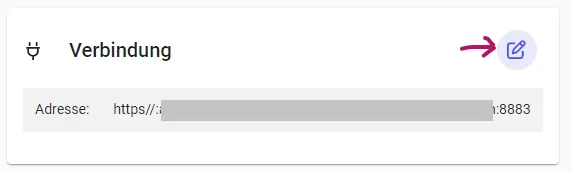
i. In the dialog that opens, adjust the protocol, address, and port (e.g. mqtt, plattform.nupis-rz.de, 8883).
ii. Click “Save”.
- Enter username and password
- In the “Login credentials” area, click the pencil icon in the top right.
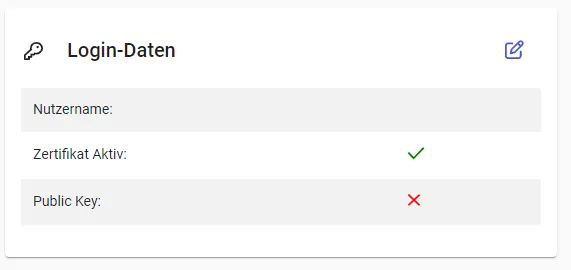
- Select the “Password” method here.
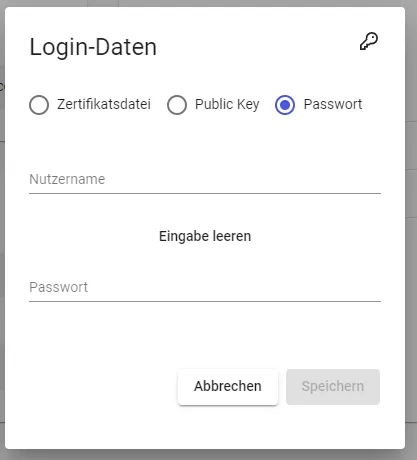
- Enter the username and password provided to you.
- Save your entries.
After these steps, the connection to the platform will be established and the connection status will be displayed. Depending on circumstances, this may take a few seconds.
Setting up measured variables
Section titled “Setting up measured variables”Once communication with the platform has been successfully configured, you can set up measured variables for transmission as needed. The measured variables for data recording in the Edge should, however, be configured first. For more information, see: How-To: Setting up data recording.
Configuring measured variables for transmission requires both selection in the gateway area and the addition of parameters/tags. The order is arbitrary. Note that measured variables without the required parameters will be ignored during transmission.
Selecting in the gateway
Section titled “Selecting in the gateway”- Navigate via “System” → “Gateway” → “NuP Endpoint”. In the right area you will see a list of extensions. Select ‘NuP Dispatcher’.
- On the following page, you can add individual or multiple measured variables for transmission using the ”+” button. This selection is made from the measured variables previously configured in the Edge. Navigate through the structure and select the desired measured variables.
- Confirm your selection using the shopping cart (top right). You then need to decide whether you want to transmit the measured values at their original resolution or aggregated. This setting can be adjusted later for each measured variable.
The selected measured variables for transmission are listed in the NuP Dispatcher overview. Here you have the option to remove measured variables or adjust aggregation settings.
Setting required parameters
Section titled “Setting required parameters”The N+P platform requires the specification of various settings for each measured variable to be transmitted to the cloud. This information includes:
- Name of the measured variable in the cloud
- Unit of the measured values
- Assignment to the plant
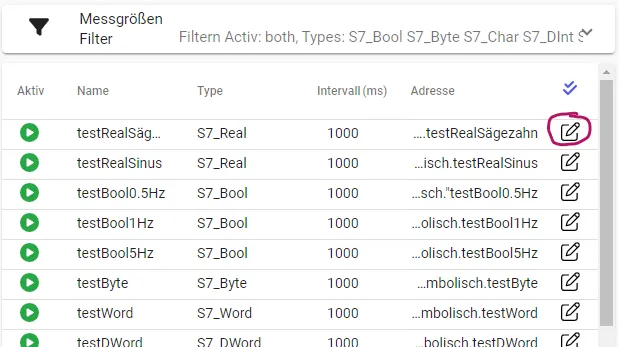
This information must be added separately for each measured variable. To do this, switch to the “All measured variables” area. Navigate to the corresponding measured variables and open the settings dialog by clicking the pencil icon to the right of the respective measured variable.
In the dialog, click the ”+ Add information” button under “Parameters”. Repeat this step until exactly 3 rows have been added. Fill in the fields as follows:
| Identifier | Value |
|---|---|
| nupName | Name of the measured variable in the cloud platform |
| nupUnit | Unit of the measured values |
| nupIdentification | Assigned plant (in the cloud) |
If you made a typo in an identifier, you can simply delete the relevant row and add a new one.
Don’t forget to save your changes at the end. They will be taken into account in the next transmission cycle.