

Network Settings
The Netzwerkeinstellungen tab of the detail panel lets you configure how an Edge device connects to the network.
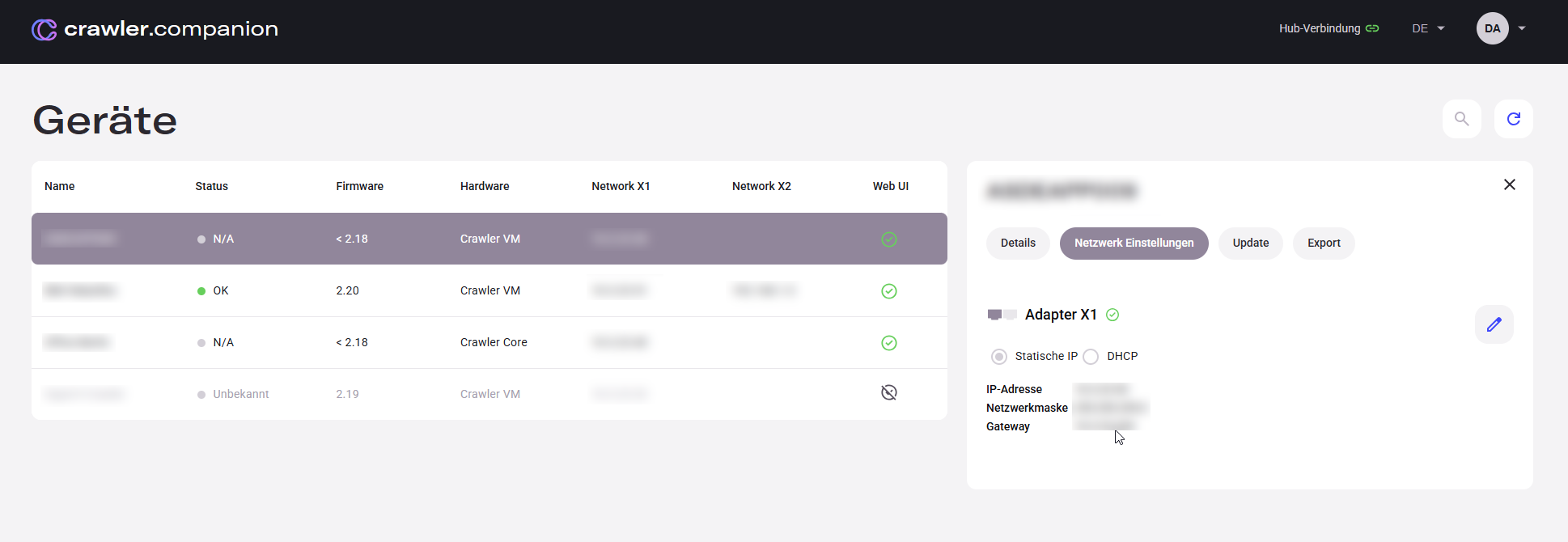
| Field | Description |
|---|---|
| Use as primary adapter | Determines which port Companion uses to communicate with the device. |
| Configuration mode | Set to Static IP — enter a fixed address manually. |
| IP address | Unique network address of the device. |
| Subnet mask | Defines the address range of the local network. |
| Gateway | Router address for communication outside the local network. |
| DNS server | Optional. Used for name resolution. |
| Field | Description |
|---|---|
| Use as primary adapter | Determines which port Companion uses to communicate with the device. |
| Configuration mode | Set to DHCP — the device receives its IP address automatically from the network. |
| DNS server | Optional. Used for name resolution. |
For a step-by-step guide on configuring network settings, see Initial Setup.