

Mouse Actions
Mouse actions
Section titled “Mouse actions”With the mouse, you can do most of the data manipulations needed in the visualization view.
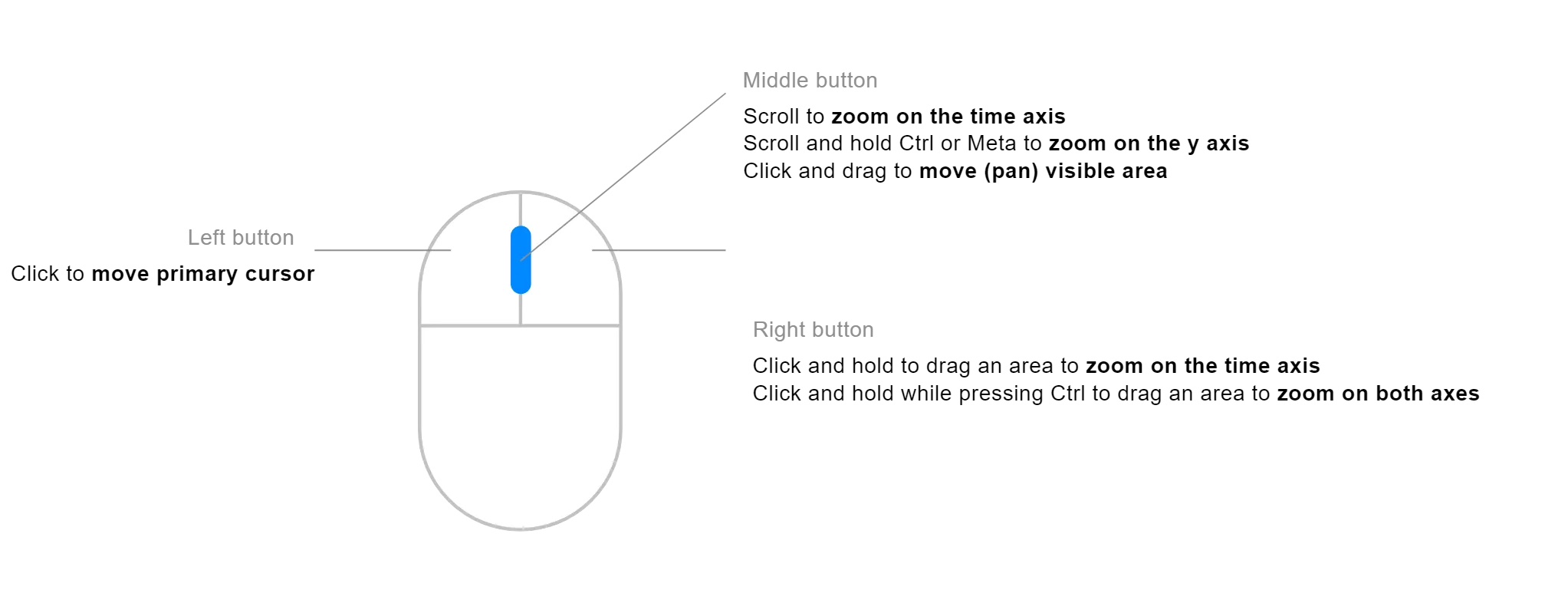
- Double click — reset zoom
- Left click — set/move the cursor
- Right click + drag — zoom to selected time range
- Right click + drag + Ctrl — zoom to selected square
- Middle button + scroll — zoom on the time axis
- Middle button + scroll + Ctrl — zoom on the y-axis
- Middle button + pan (left/right) — pan the time axis
- Swipe vertical — zoom plot range
- Swipe horizontal — pan
Touchpad
Section titled “Touchpad”Deepview can be used with a laptop’s touchpad.
To zoom in/out in time, slide up and down with two fingers on the touchpad. Move left and right to pan in time.
- 2-finger up/down — zoom in time
- 2-finger left/right — pan in time (left/right)
- Swipe vertical — zoom plot range
- Swipe horizontal — pan
Add and remove cursors
Section titled “Add and remove cursors”- Left click — add cursor at mouse position
- Space — add a second cursor at mouse position
- Esc — remove cursors