State
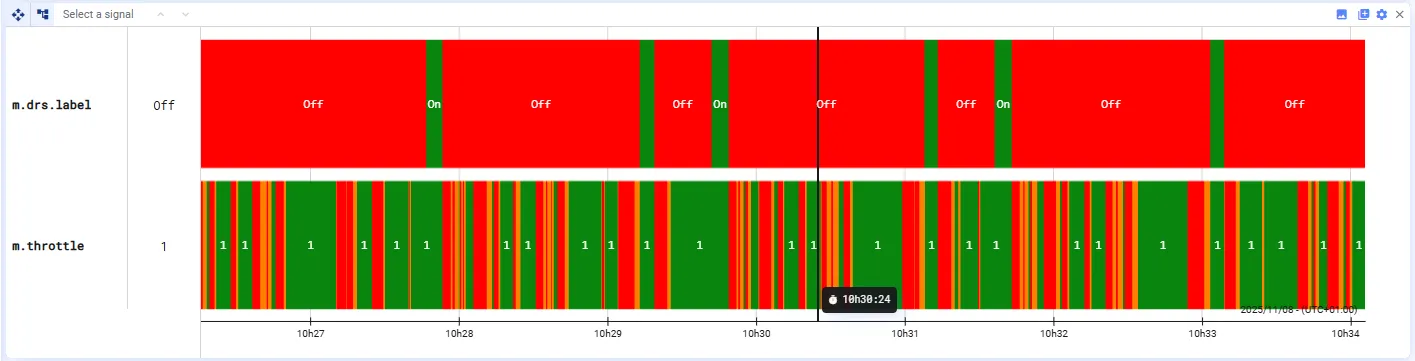
State plots display the state of one or more signals over time by assigning colors to different value conditions. Each signal appears as a horizontal bar where the color indicates the signal’s state at any moment.
Defining state colors
Section titled “Defining state colors”You can define color rules based on conditions, such as:
- signal value < X
- signal value > X
- signal value = X
Each rule assigns a specific color and label when its condition is met.
Adding signals
Section titled “Adding signals”You can add as many signals to a State plot as you need, by drag and drop. Each signal has its own row with its own set of state rules.
Plot settings
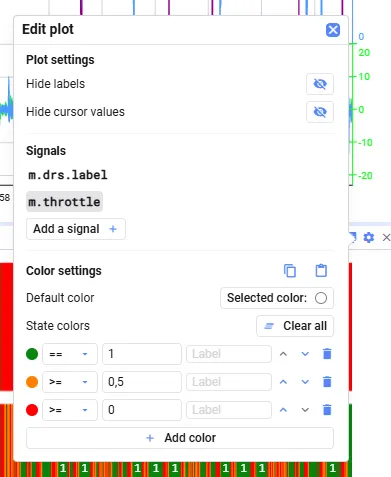
Section titled “Plot settings”In the plot settings, you can:
- Hide labels
- Hide cursor values
- Select a signal to configure its Color settings — they only appear once a signal is added and selected
Color rules
Section titled “Color rules”Under Color settings, each row in State colors is one rule: a condition, a value, a color and an optional label. Rules are evaluated top to bottom — reorder them with the arrows. The plot applies the first rule that matches the value for each time range, and Default color where none matches.
- Add color adds a rule
- Add all inserts all states currently visible in the plot
- Clear all removes all rules